01 — Clipboard Manager
Copy once.
Paste
anywhere.
SimplePasteVault silently saves everything you copy — automatically, privately, on-device. Access your full clipboard history from any app with a custom keyboard.
01 — Clipboard Manager
SimplePasteVault silently saves everything you copy — automatically, privately, on-device. Access your full clipboard history from any app with a custom keyboard.
Features
A clipboard manager built for precision — not bloat. Six focused capabilities that change how you work across every app.
A small floating window keeps SimplePasteVault active while you browse and copy across apps. Every copy captured — no manual switching.
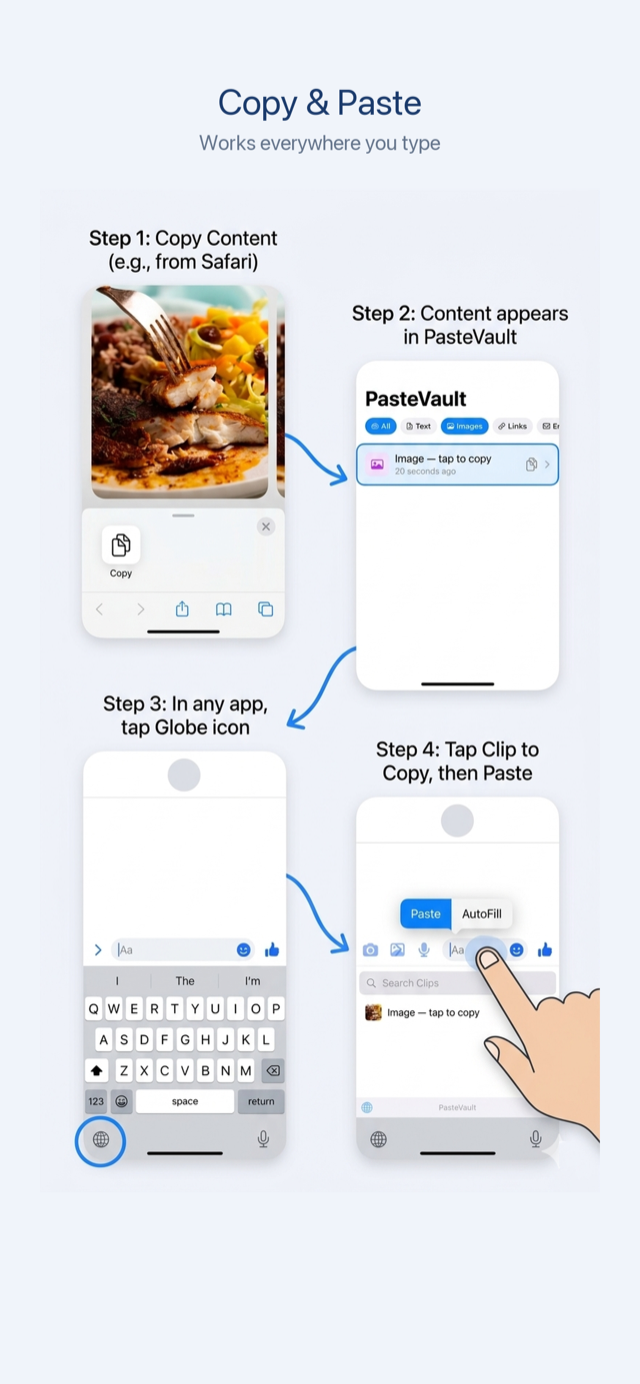
Tap the globe icon to switch to SimplePasteVault from any app — Messages, Mail, Safari, Notes — and paste from your full history.
Clips automatically sorted into Text, Links, Images, and Email. Filter bar and full keyword search across your entire history.
Add a widget for instant access to your most recent clips. Tap to copy without even opening the app.
Save content from any app using the Share menu. Send text, links, or images directly to SimplePasteVault without copying first.
Old clips deleted on your schedule. Pin important clips to keep them forever. You decide how long everything stays.
How It Works
Copy text, links, images, and more as you always have. SimplePasteVault runs quietly in the background, capturing everything automatically.
A small floating window keeps SimplePasteVault alive while you browse and work across apps — no manual back-and-forth required.
Tap the globe icon to switch to SimplePasteVault from any text field. Browse your full history and tap any clip to paste it instantly.
Use categories and keyword search to find any clip fast. Pin the ones you need long-term; let the rest clean up automatically.
Overview
Built with SwiftUI and SwiftData for iOS 17 and later. Everything runs on your device — no accounts, no servers, no cloud.
SimplePasteVault saves everything you copy — automatically, privately, and on-device. Access your full clipboard history from any app with a custom keyboard.
Tap "Monitor Clipboard" to enable background monitoring. A small floating window keeps SimplePasteVault active while you browse, copy, and work across apps. Every copy is captured automatically — no switching back and forth.
Access your entire clipboard history from any app. Tap the globe icon to switch to SimplePasteVault, browse your clips, and tap to paste. Works in Messages, Mail, Safari, Notes — everywhere you type.
Clips are automatically sorted into Text, Links, Images, and Email. Use the filter bar to quickly find what you need. Search across your entire history by keyword.
Add a widget to your home screen for instant access to your most recent clips. Tap to copy without even opening the app.
Save content from any app using the Share menu. Send text, links, or images to SimplePasteVault without needing to copy them first.
Old clips are automatically deleted based on your retention settings. Pin important clips to keep them forever. You control how long everything stays.
Full access for 7 days. After the trial, view your 2 most recent clips for free. Unlock unlimited clipboard history with a single one-time purchase — no subscription, no hidden fees.
Privacy First
Zero data collection. Zero telemetry. Zero servers. Everything SimplePasteVault stores lives exclusively on your device — always.
All clipboard data stored locally using SwiftData. Nothing ever transmitted externally.
No tracking SDKs, no analytics, no ad networks. Your usage patterns stay with you.
No sign-up, no login, no email. Download and use immediately — no registration ever.
Full access for 7 days, free. One-time unlock for unlimited history — no subscription.